
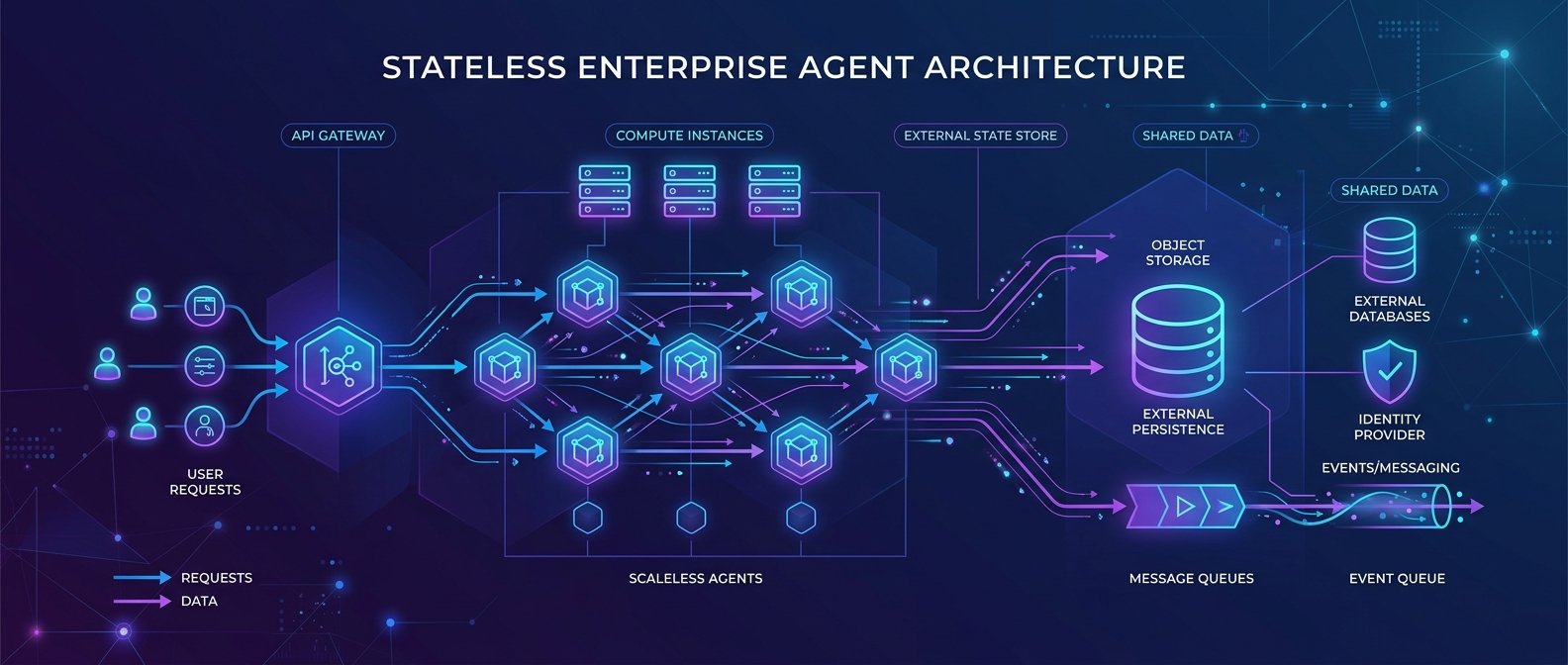
📌 本文重點
- MCP 無狀態後,會話管理回到 Agent / Orchestrator
- ACL、租戶隔離集中在 MCP Gateway 控制
- Loop / graph / memory 拉升到框架層,工具端保持純 stateless
MCP 改成無狀態(stateless)之後,一個很直接的好處是:你不必再在工具層維護「會話」。會話管理、記憶、ACL、租戶隔離,全部拉回到 Agent 平台或中間層控管。
好處是:
- 工具 server 更單純、可橫向擴展、可獨立部署與審核
- 可觀察性與安全治理集中在一層,易於做 ADR 類型的觀察與基準測試
- 任何「狀態」錯誤不會被藏在 MCP server 裡,而是明確暴露在 orchestration 層
以下用一個典型架構:前端 Orchestrator + MCP Gateway + 多個工具 server,拆解你需要怎麼重構。
重點說明:MCP 無狀態後的三個核心變更
1. 會話被砍掉:改用 request-scoped metadata
新版 MCP 刪除 session / conversation state,協議只管:
- 一次呼叫的 工具名稱(tool)、參數(args)
- 一組可選的 metadata / headers
上下文與記憶不再由 MCP 持有,而是由:
- Client / Orchestrator:維護任務 graph、loop、記憶
- 中間層(MCP Gateway):附加租戶、風險標籤、追蹤 id
- 工具端:只在必要時讀取 metadata,自己不產生「隱藏狀態」
你要把原本塞在 MCP session 內的資訊,改寫成 每個 request 都帶的 metadata(如:tenant_id, agent_task_id, risk_level)。
💡 關鍵: MCP 不再維護任何會話狀態,所有上下文都改成「每次請求顯式帶 metadata」,讓狀態集中在可治理的 Orchestrator 層。
2. Stateless MCP 上做 ACL 與租戶隔離
沒有 session,不代表不能做授權。反而更乾淨:
- 每個 MCP request 都帶 caller identity(user / agent / tenant)
- Gateway 根據 metadata 做 per-tool ACL,決定能不能 call 該工具
- 工具 server 自身只 trust Gateway 轉給它的 identity,不自己管理 session
典型做法是在 MCP 層定義:
x-tenant-id:租戶隔離x-agent-id:是哪個 agent runtime/workflowx-permissions:如read:db,write:file,由 Gateway 檢查是否符合 policy
3. Loop / Graph / Memory 抬升到框架層
之前很多人把:
- 迴圈控制(while loop)
- 任務 graph / sub-agent 派工
- 記憶(conversation history / RAG context)
塞在 MCP server 裡,以為「工具端順便幫我記住上下文」。無狀態之後,你必須把這些搬到 Agent runtime / orchestration framework:
- Loop:由 Orchestrator 控制是否繼續呼叫 MCP 工具
- Graph:用 DAG / state machine(例如:
Prefect、Temporal、自建FSM)管理多步驟流程 - Memory:由獨立記憶服務(
Vector DB/KV store)持有,MCP 工具只接收明確的 context(如docs_chunk_ids)
這對專案的實際好處是:所有高風險邏輯集中在可治理的層,可以對 loop 數量、工具調用頻率、記憶寫入/讀取做 FinOps、審計與基準測試,而不是到處分散在工具端。
💡 關鍵: Loop、graph 與 memory 全部拉回 Orchestrator,才能精準控管成本、風險與審計路徑。
實作範例:用 request metadata 重建「會話」與治理
以下用一個簡化範例示範:
- 前端 Orchestrator(可能是自家 Agent runtime)
- MCP Gateway(實際對接工具 server)
- 多個 stateless MCP 工具
1. Orchestrator:每次工具呼叫都帶 context_id / tenant
# orchestrator.py
import uuid
from mcp_client import MCPClient  # 假設有這個 client SDK

client = MCPClient(base_url="https://mcp-gateway.internal")

async def run_agent_task(user_id: str, tenant_id: str, task_input: str):
    task_id = str(uuid.uuid4())

    # 這裡的 memory / graph 在 orchestrator 層
    memory_context = load_memory_for_user(user_id)
    workflow_state = init_workflow_state(task_input, memory_context)

    while not workflow_state.done:
        tool_request = workflow_state.next_tool_call()

        response = await client.call_tool(
            tool_name=tool_request.name,
            args=tool_request.args,
            headers={
                "x-tenant-id": tenant_id,
                "x-user-id": user_id,
                "x-agent-task-id": task_id,
                "x-workflow-step": str(workflow_state.step),
                "x-risk-level": "normal",
            },
        )

        workflow_state = workflow_state.apply_tool_result(response)
        persist_step_log(task_id, workflow_state, response)

    save_memory_for_user(user_id, workflow_state.memory_delta)
    return workflow_state.final_output
重點:
- 沒有
session id,只有task_id+step,所有狀態在 orchestrator 層 - 每個 request 都有完整的治理 metadata,可給 ADR 類工具做觀察與威脅檢測
💡 關鍵: 用
task_id + step取代 session,把整個任務完整還原成可審計的步驟序列。
2. MCP Gateway:per-tool ACL + 租戶隔離
// mcp-gateway.ts (Node/TypeScript pseudo-code)
import { verifyToken, checkAclPolicy } from "./auth";
import { routeToToolServer } from "./router";

async function handleMcpRequest(req, res) {
  const { toolName, args } = req.body;
  const headers = req.headers;

  const token = headers["authorization"];
  const identity = await verifyToken(token); // 解析 user/agent/tenant

  const tenantId = headers["x-tenant-id"] ?? identity.tenantId;
  const agentTaskId = headers["x-agent-task-id"];

  // ACL 檢查:哪些工具可被哪個 identity 使用
  const allowed = await checkAclPolicy({
    identity,
    tenantId,
    toolName,
  });
  if (!allowed) {
    return res.status(403).json({ error: "tool_not_allowed" });
  }

  // 建立統一的 observability context
  const observabilityContext = {
    tenantId,
    userId: identity.userId,
    agentId: identity.agentId,
    agentTaskId,
    toolName,
    timestamp: Date.now(),
    requestId: generateRequestId(),
  };

  logRequest(observabilityContext, args); // 提供給 ADR / SIEM

  const toolResponse = await routeToToolServer(toolName, args, {
    "x-tenant-id": tenantId,
    "x-agent-task-id": agentTaskId,
    "x-request-id": observabilityContext.requestId,
  });

  logResponse(observabilityContext, toolResponse);
  return res.json(toolResponse);
}
重點:
- ACL 與租戶隔離在 Gateway 層,而不是工具 server 內部
- observability context(
requestId,agentTaskId,toolName)可以直接餵給 ADR 類似的威脅檢測/基準測試
3. MCP 工具 server:純 stateless,禁止偷塞 state
# tools/db_query_server.py
from fastapi import FastAPI, Header

app = FastAPI()

@app.post("/tools/db_query")
async def db_query(query: str, x_tenant_id: str = Header(...), x_agent_task_id: str = Header(None)):
    # 僅用 tenant_id 做資料邊界控制,不維護會話
    if not is_tenant_allowed_to_query(x_tenant_id, query):
        return {"error": "tenant_query_not_allowed"}

    result = execute_query_for_tenant(query, x_tenant_id)

    # 嚴禁在 server 內部開 global session dict
    return {
        "rows": result,
        "meta": {
            "agent_task_id": x_agent_task_id,
        },
    }
重點:
- 工具 server 僅依賴 headers 決定授權與資料範圍
- 不建議在工具 server 開 global cache 作為「會話記憶」,避免破壞 stateless 模型與可觀察性
建議與注意事項:遷移時常見坑與最佳實踐
1. Server 假設有持久連線 / session
舊版 MCP 或自家協定常常:
- 用
WebSocket/ 長連線維護 session - 把 user state 放在 in-memory dict(例如
sessions[user_id])
在改成 stateless MCP 時:
- 所有 state 都要變成可持久化的 store(
DB/Redis/Vector DB),由 Orchestrator 控制 - 工具端只讀取 request headers,不再假設「同一連線就是同一會話」
實務建議:
- 先畫出「哪些資料被當作 session state 使用」
- 將它們搬到 明確的 Memory API 上(例如:
load_memory(user_id)/save_memory(user_id, delta))
2. 工具端偷塞 state,導致 log 無法重建任務路徑
常見情境:
- 工具 server 依賴 local cache / global dict 記住「上一次呼叫結果」
- log 只有 request/response,但沒記錄「為什麼 agent 會做出這個決策」
在 MCP 無狀態模型下,要做到可觀察性與安全基準測試(ADR 類工具),你需要:
- 每個 step 的決策都由 Orchestrator log(含 prompt, context, tool call)
- 工具 response 只是一個 pure function 輸出,不混入隱藏狀態
實務建議:
- 強制所有工具 server 通過 MCP Gateway,Gateway 追加
x-request-id,並集中 log - 在 Orchestrator 保存 完整任務 graph,例如:
{
  "agent_task_id": "task-123",
  "steps": [
    {"step": 1, "tool": "search_docs", "request_id": "r-1"},
    {"step": 2, "tool": "db_query", "request_id": "r-2"}
  ]
}
有了這些資料,像 Uber 的 ADR 就可以做:
- 單一任務的威脅路徑分析(哪一步嘗試讀敏感資料)
- 持續的安全基準測試(某種輸入是否總是觸發高風險工具)
3. Loop / Graph / Memory 不要塞在 MCP 裡
受「while loop 就是 agent」的影響,很多人以前:
- 在 MCP server 裡面直接實作 while loop 反覆 call LLM
- 把 graph / workflow 寫在工具端 code 裡
這在無狀態更新後會變成技術負債:
- 難以在平台層做 FinOps(每個 loop 要花多少 token / 工具成本)
- 難以對 loop 數量與深度做 安全限制(避免無限迴圈或風險疊加)
最佳實踐:
- Loop:在 Orchestrator(或專門的 agent runtime)層,用明確的限制,如
max_steps,max_cost - Graph:用可視化、可配置的 workflow 定義(
YAML/JSON/DSL),不寫死在 MCP 工具程式碼裡 - Memory:獨立成一個工具或服務(如
memory.read,memory.write),由 ACL 管控誰能讀寫
4. 安全與治理:利用 stateless 做更強的控制平面
MCP 無狀態其實大幅簡化了 企業級治理:
- 所有工具呼叫都經過同一層 Gateway,可以:
- 限制每個 agent / tenant 的 工具配額與成本
- 對特定工具設高風險標籤,必須經過額外審核或輸入過濾
- Observability context(
tenantId,agentTaskId,toolName,requestId)可以直接餵給: - ADR / SIEM / 自家監控平台,做威脅檢測與基準測試
實務上,你可以定義一個簡單的 治理 schema:
# governance.yaml
agents:
  finance_report_agent:
    max_tool_calls: 50
    allowed_tools:
      - db_read_only
      - email_notify
    risk_budget: medium

tools:
  db_read_only:
    risk_level: high
    requires_human_review: true
然後在 Orchestrator + MCP Gateway 共同實作:
- 在 loop 前檢查
max_tool_calls - Gateway 看到
risk_level: high時,會把這些 call 寫入特別的安全 log,供 ADR 分析
結論
MCP 無狀態化的關鍵結論:
- 會話狀態不再是協議責任,而是 Agent 平台責任
- 上下文與記憶要由 client / orchestration / memory 工具明確持有
- stateless 帶來更乾淨的可觀察性與安全治理模型,能與 ADR 這類工具自然整合
如果你的企業 Agent 平台還在仰賴 MCP session 或工具端隱藏 state,現在是重構的好時機:把 loop、graph、memory、ACL、租戶隔離全部拉回到框架層,留給 MCP 的只有乾淨、可審核、可擴展的工具呼叫。
🚀 你現在可以做的事
- 審視現有 MCP / 工具 server,列出所有依賴 session 或 in-memory state 的地方,規劃改成 metadata + Orchestrator state
- 為 MCP Gateway 增加
x-tenant-id、x-agent-task-id、x-request-id等 headers,並接入現有的 ADR / SIEM / 監控系統- 設計一份
governance.yaml或類似設定檔,為主要 agent 定義max_tool_calls、allowed_tools與risk_budget,並在 Orchestrator 中強制執行